How to share OSINT results: one link that lasts 24 hours
Share what sherlock, holehe or any OSINT tool found as one link that expires after a day, with ot share and otlite share. Worked examples inside.
To share OSINT results, save the run and give its id to ot share, as in ot share 3f9a1c2e; with otlite, give
otlite share the result file. It uploads the saved run and prints a link on otinstaller.com that anyone you send it
to can open for 24 hours, and then the registry deletes it. The page shows the inputs, every account, email, domain or
address the tool found, and its raw output. It never says who shared it, and your case names, command lines and file
paths stay on your machine. It works for every tool on the registry, from sherlock
to holehe, because every run is saved in the same shape.
Until now the choices were a screenshot, which cuts the result off at the edge of the window and can’t be searched, a copy of the results folder, which carries your paths and case names with it, or pasting the terminal into a chat. A link fixes all three: the other person sees the whole result, laid out the same way for every tool, and it is gone the next day.
Share a run in two commands
Every run ot makes is saved under results/, and ot runs lists them, newest first, with the id each one has:
ot runs
RUN       STARTED           TOOL                           TARGET    STATUS    ENTITIES  CASE
77b0e1d4  2026-10-27 15:47  osintverse-community/holehe    jane_doe  complete  1         acme
3f9a1c2e  2026-10-27 15:45  osintverse-community/sherlock  jane_doe  complete  3         acme
Give one of those ids to ot share. It says what will go up and asks before anything leaves your machine:
ot share 3f9a1c2e
Share 1 run (sherlock) on jane_doe for 24 hours?
  - Anyone with the link can see the inputs and everything the tools found, until it expires in 24 hours.
  - File paths, the case name and the command line stay on this machine.
  - It is not linked to any account; `ot shares rm` on this machine deletes it early.
Share? [y/N] y
Shared 1 run: https://otinstaller.com/r/m9A1n2bwQwZ68om4xXDY1g
The link works until 28 Oct 10:09 (in 24 h). Delete it sooner with `ot shares rm m9A1n2bwQwZ68om4xXDY1g`.
Send the link however you like: a chat message, a ticket, an email. ot share also takes the path of a saved result
file, and several ids at once (ot share 3f9a1c2e 77b0e1d4), which puts them on one page.
Share a whole investigation as one link
Most searches run more than one tool. A username can go through sherlock and maigret, the email address it leads to
through holehe, and the domain behind that through the domain tools. Keep those runs together with
--case, and share the case:
ot run osintverse-community/sherlock u:jane_doe --case acme
ot run osintverse-community/holehe e:jane_doe@example.com --case acme
ot share --case acme
Share 2 runs (sherlock, holehe) on jane_doe, jane_doe@example.com for 24 hours?
Every run saved under results/cases/acme/ goes on the same page, oldest first. ot auto takes --case too, and a
playbook keeps its runs in a case of its own (playbook-<name>), so one link can hold an entire
username investigation or email investigation. One share takes up to 50 runs and
5 MB.
What the person you send it to sees
The link opens a page like this one, made from two test runs against the example username jane_doe:
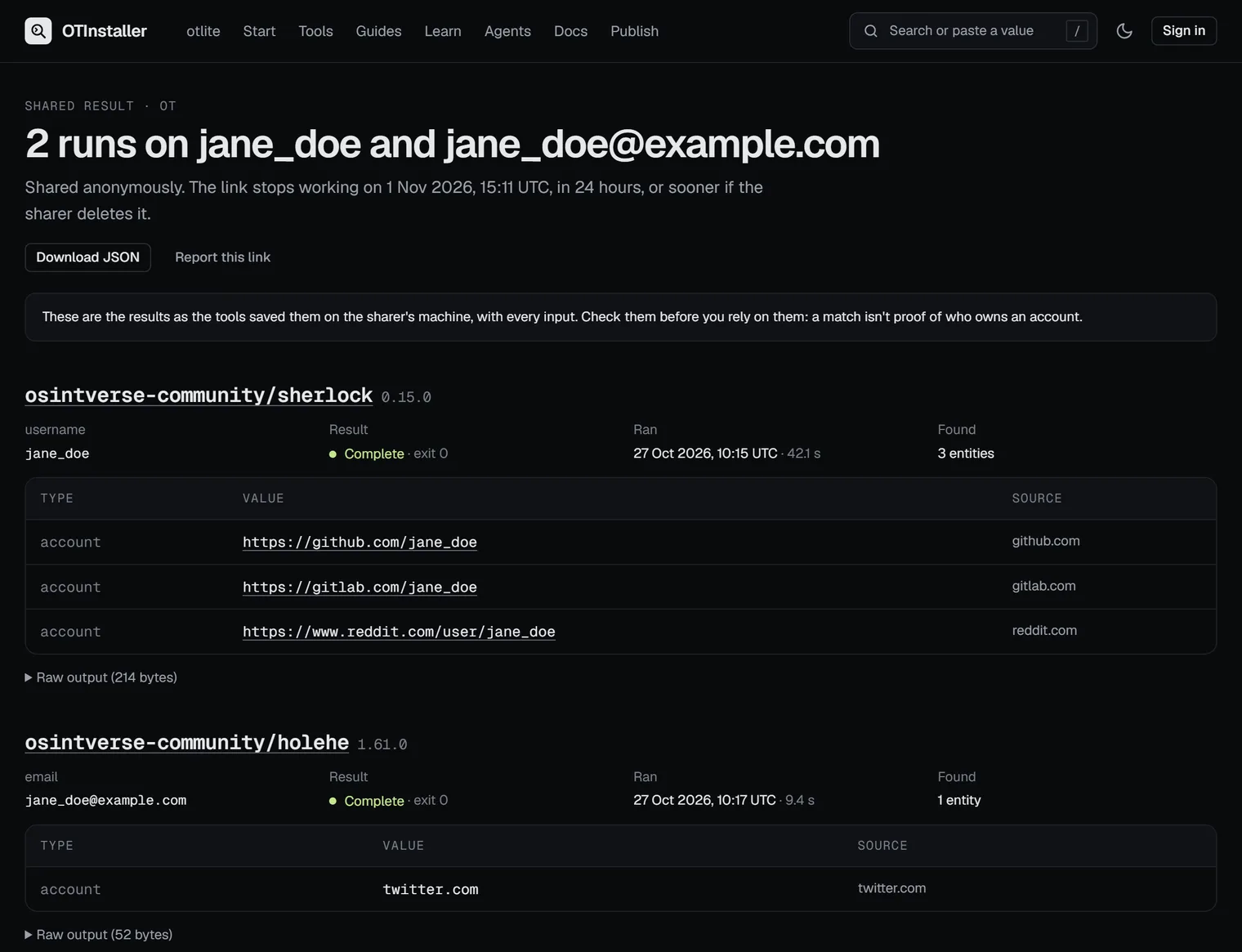
For every run there is the tool and its version (linked to its page on the registry), the inputs, whether it completed, its exit code, when it ran and for how long, and a table of what it found: each entity’s type, value and the site it came from. Web addresses are links. Below the table, the tool’s raw output opens on a click, and Download JSON gives the whole share as data for a script or another tool. The page says when the link stops working, and it reminds the reader that a match is not proof of who owns an account.
What goes up, and what stays on your machine
Each run goes up as its result envelope, the same JSON shape ot run prints, described in Results.
ot share --dry-run prints exactly what would be uploaded and sends nothing. This is the start of it for the case
above:
ot share --case acme --dry-run
{
  "share": 1,
  "source": "ot",
  "runs": [
    {
      "envelope": 1,
      "tool": "osintverse-community/sherlock@0.15.0",
      "runtime": "docker",
      "input": {
        "username": "jane_doe"
      },
      "started_at": "2026-10-27T10:15:00Z",
      "ended_at": "2026-10-27T10:15:42Z",
      "duration_ms": 42100,
      "exit_code": 0,
      "status": "complete",
      "entities": [
        {
          "type": "account",
          "value": "https://github.com/jane_doe",
          "source": "github.com"
        },
What goes up for each run:
- the tool and its version, and how it ran (Docker, pipx or otlite)
- the inputs you gave it
- when it started and ended, its exit code and how it ended
- every entity it found, with its source and any details the tool added
- its warnings
- its raw output, unless that is over 1 MB (then the entities still go, and a warning says the raw output was left out)
What stays on your machine:
- the run id and the case name
- the command line, with any flags you passed
- the paths of your result files, which usually include your user name
- anything the tool wrote to stderr
- your API keys:
otpasses them to a tool without ever writing them into a saved run
ot leaves these out of the upload, and the registry drops them again if they ever arrive. The format is published
as a JSON Schema, share-v1.
How the link stays private
A shared result is meant for the people you give the link to, so the page keeps out of everyone else’s way:
- The link is the only key. Its id is 22 random characters, so it can’t be guessed or counted through.
- It isn’t indexed. The page tells search engines not to index it, and robots.txt keeps crawlers off every shared result.
- It isn’t cached. Neither the registry’s edge cache nor your browser keeps a copy, so a deleted link stops working at once.
- No referrer leaves it. When the reader clicks one of the accounts in the results, that site is not told where they came from.
- The site’s page counts never see the id. Analytics records
/r/:id, never the link itself. - It says nothing about who shared it. No name, account or machine appears on the page or in the JSON.
The results themselves are whatever the tools found, so they often contain personal data. Share them only with people who should see them. The acceptable use policy covers shared links, and every page has a Report this link button that reaches the team.
How long does a shared link last?
Exactly 24 hours from when it was made. The page says when it stops working, and after that the link answers that
it has expired. The registry deletes the results within a quarter of an hour of that. Nothing extends a link; to share
the same runs again, run ot share again and send the new link. The privacy policy says what the
registry keeps and for how long.
Delete a shared link early
ot shares lists the links you made that still work:
ot shares
ID                      EXPIRES  TOOLS             URL
JAwWL7ISyNs75vkCqfFkZQ  in 24 h  sherlock, holehe  https://otinstaller.com/r/JAwWL7ISyNs75vkCqfFkZQ
ot shares rm deletes one, by its id or the whole link:
ot shares rm JAwWL7ISyNs75vkCqfFkZQ
Deleted JAwWL7ISyNs75vkCqfFkZQ; the link no longer works.
That works on the machine you shared from without an account: ot keeps each link’s delete token in its data folder,
readable only by you. When ot is signed in (ot login), a share is also linked to your account, which nobody else
can see. Then ot shares lists it on any machine you are signed in on, and
Settings → Shared results lists it on the website, with a button that deletes it. Add
--anonymous to leave your account out of a share.
Share from a script or a CI job
Without a terminal there is nobody to answer the question, so ot share stops and says what to pass:
ot share 3f9a1c2e
error: sharing results puts them on the web, so it asks first, and there is no terminal to ask in; pass --yes
With --yes it shares straight away, and --json prints the answer as data, delete token included, so a script can
post the link and delete it later:
ot share --case acme --yes --json
{
  "id": "JAwWL7ISyNs75vkCqfFkZQ",
  "url": "https://otinstaller.com/r/JAwWL7ISyNs75vkCqfFkZQ",
  "created_at": 1793459471969,
  "expires_at": 1793545871969,
  "delete_token": "…",
  "owned": false,
  "runs": 2,
  "tools": [
    "osintverse-community/sherlock@0.15.0",
    "osintverse-community/holehe@1.61.0"
  ]
}
Keep the delete token out of logs. One address can make 20 shares an hour without an account, and a signed-in account 60. The CLI reference lists every flag.
Share results from otlite
otlite, the edition that runs on Linux and macOS without Docker, has the same command. It takes a result
file (the .txt output, its .meta.json or its .envelope.json), a case, or a tool and target for that tool’s newest
run:
otlite share results/sherlock/jane_doe/20261027-101500_sherlock_jane_doe_ab12cd34.txt
otlite share --case acme
otlite share --tool sherlock --target jane_doe
otlite shares
otlite shares rm <id>
It asks before uploading, and --yes, --dry-run and --json work as they do in ot. otlite has no accounts, so its
links are always anonymous, and otlite shares rm deletes one early from the machine that made it. The output text
goes up as the raw output, up to 1 MB. See the otlite docs.
Let an AI agent share results
ot mcp gives AI agents a share_runs tool, so an agent working through a case with you can hand you a link to what
it found. Whatever your agent policy lets an agent do without asking, sharing always asks you first,
with the same question ot share asks. The agent gets the link, never the delete token, and every share it makes is
written to the local audit log (ot mcp audit). MCP tools has its arguments.
The commands at a glance
| Command | What it does |
|---|---|
ot share 3f9a1c2e |
Share one saved run, after asking |
ot share 3f9a1c2e 77b0e1d4 |
Share several runs on one page |
ot share --case acme |
Share every run in a case |
ot share 3f9a1c2e --dry-run |
Print what would be uploaded, upload nothing |
ot share 3f9a1c2e --yes --json |
Share without asking, and print the answer as JSON |
ot share 3f9a1c2e --anonymous |
Leave your account out, even when signed in |
ot shares · ot shares rm <id> |
List your links that still work · delete one |
otlite share --case acme · otlite shares rm <id> |
The same with otlite |
ot share needs ot 0.19.0 or later and otlite share needs otlite 1.5.0 or later: ot self-update updates
ot, and otlite check-updates gives the command that updates otlite. New to both? Getting started installs ot in
a minute, and the posts on username search tools and
email OSINT tools have runs worth sharing. Sharing a result
in the docs is the short reference.
More posts · Changelog · This post as Markdown